

Running a business in Nigeria or across Africa means juggling a thousand small tasks that eat up your day. You open emails, download PDFs, scan through customs forms, and type the same supplier details into spreadsheets over and over. This is not only tedious; it is also expensive. Every hour your team spends on manual data entry is an hour they are not growing your business, serving customers, or improving operations. That is why an AI document workflow automation system is no longer a luxury; it is a strategic move to cut costs, reduce errors, and scale faster.
Imagine this: instead of your staff manually typing invoice numbers into your bookkeeping system, the program reads the PDF, pulls out the right fields, checks for compliance, and updates your records automatically. No more typos. No more late payments. No more scrambling to fix a supplier’s misplaced tax ID. That is the power of moving from manual processes to an AI-first approach.
The limits of legacy OCR vs. AI document workflow automation
Most businesses still rely on outdated tools that were never designed for today’s messy reality. Legacy OCR systems, for example, can read text from a PDF, but only if the document looks exactly like the template they were trained on. Change the layout slightly, and the system fails. A supplier sends a slightly rotated scan, or a customs form has a handwritten note in the margin? Manual re-entry becomes inevitable. This highlights the need for advanced document automation tools that can adapt on the fly.
In African markets, documents are rarely clean or standardized. You might receive:
- A blurry photo of a delivery note taken on a warehouse floor
- A scanned receipt with smudged ink
- A PDF with inconsistent formatting from different suppliers
Traditional automation tools break under these conditions. They require constant rule updates, manual fixes, and endless troubleshooting. Implementing an AI-driven document workflow platform ensures your systems adapt instead of break. It learns from context, handles variations, and flags anomalies, acting just like a sharp-eyed clerk, but at machine speed.
Key advantages of AI document workflow automation
It is not just about extracting text. It is about understanding what that text means in your business context. For example, leveraging intelligent document routing ensures your systems adapt to messy formatting while understanding the actual business meaning of each document. When you automate document processing using intelligent engines, you turn raw pixels into structured business intelligence.
- An invoice is not just a block of numbers: it is a record of a transaction that needs to be matched to a purchase order and logged in your accounting system.
- A customs clearance sheet is not just text: it is a compliance document that must be verified against government databases before goods are released.
- A client receipt is not just a payment proof: it is a trigger to update your customer records and trigger follow-up communications.
Here is how the three main approaches compare when handling a typical supplier invoice:
| Approach | Speed | Accuracy | Flexibility | Compliance |
|---|---|---|---|---|
| Manual Processing | Slow (10 to 30 minutes per document) | Low (human fatigue, typos, misreads) | High (humans adapt to any format) | Manual checks only |
| Legacy OCR + Templates | Fast (seconds, but setup-heavy) | Medium (breaks on layout changes) | Low (fails on variations) | Not built-in |
| AI-First Workflow | Instant (seconds, no templates needed) | Very High (learns context, flags outliers) | Very High (handles any format) | Automated rules and checks |
Notice the difference? With an AI-first system, you are not just speeding up a process: you are making it reliable, scalable, and future-proof. It acts as a foundation for broader business process automation across your entire enterprise.
Three core capabilities of an intelligent document system
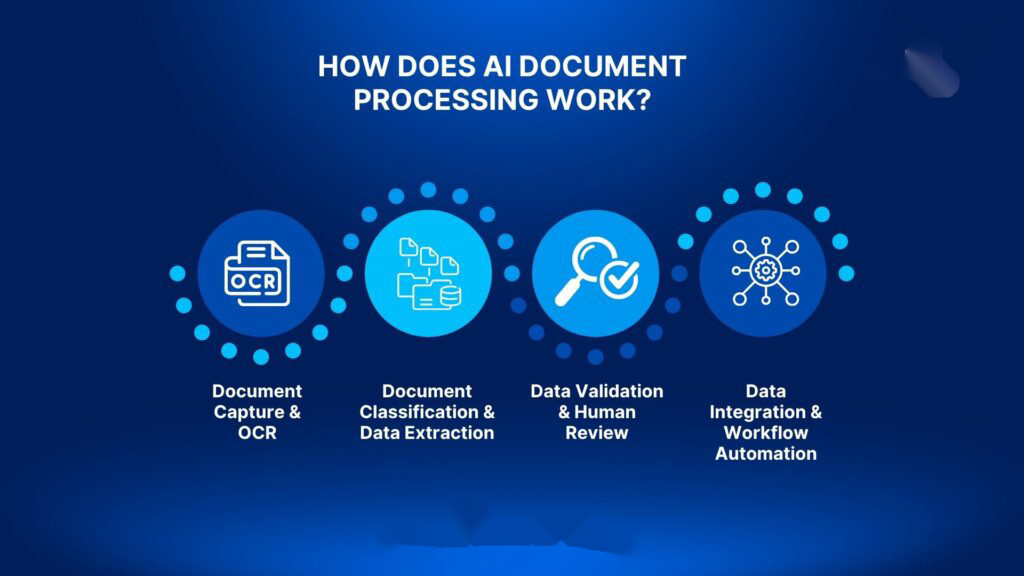
To move from manual chaos to automated clarity, your system must handle three key phases seamlessly. Each phase builds on the last, creating a smooth flow of data from ingestion to action.
1. Dynamic ingestion and AI PDF analysis
Your workflow starts the moment a document lands in your inbox, upload portal, or shared drive. Instead of treating a PDF as a static image, deep AI PDF analysis instantly classifies it: Is this an invoice? A customs form? A tax certificate? Then it extracts the relevant data, such as supplier name, invoice number, date, and amount, without needing rigid templates. This step helps reduce manual data entry from the very beginning of the process.
This works even when documents are messy. A slightly skewed scan? The AI corrects for perspective. Handwritten notes in the margin? It ignores them. A different font or layout? No problem. The system adapts because it understands the meaning behind the text, not just the pixels, making it an essential use case of AI for business documents.
2. Automated compliance checks
Compliance is not optional, especially in Nigeria and across Africa. Whether you are onboarding a new supplier, processing a tender, or renewing a license, you need to verify credentials quickly and accurately. Manually checking a Tax Identification Number (TIN) against the Federal Inland Revenue Service (FIRS) database or confirming a Corporate Affairs Commission (CAC) registration can take hours per document.
An AI-powered system can execute automated compliance checks instantly. It pulls the registration number from the document, queries the relevant government database, and flags any discrepancies before you approve a payment or sign a contract. This is not only faster; it reduces risk and protects your business from costly compliance failures.
3. Seamless integration with your business tools
Extracted data is only useful if it ends up where it needs to go. Your accounting software, ERP, or inventory system should update automatically based on the AI’s findings. No more copy-pasting. No more double data entry. No more forgotten invoices.
For example, your complete automated document pipeline can handle the following automatically:
- A supplier invoice is processed by the AI, the data is validated, and the payment is scheduled in your accounting platform.
- A customs clearance sheet is analyzed, the shipment is approved, and your inventory system is updated in real time.
- A client receipt triggers a follow-up email and updates your CRM, keeping your sales team informed.
This is where the real value kicks in: your team stops being data entry clerks and starts focusing on strategy, customer service, and growth.
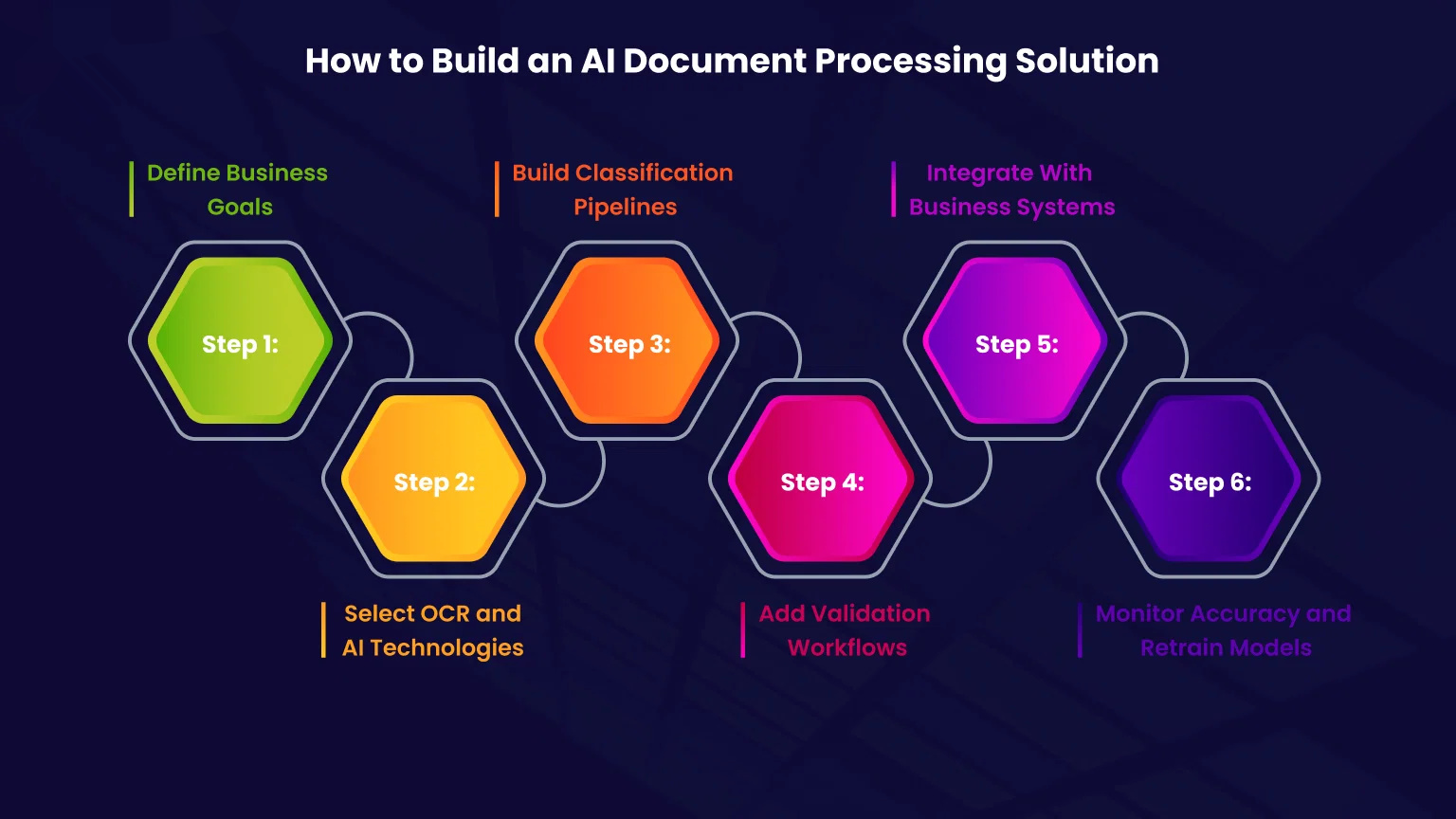
How to build your AI-first document workflow step by step
You do not need a team of data scientists or a massive budget to get started. With the right tools and a clear plan, you can build a working prototype in a few weeks. Here is how.
Step 1: Start with your biggest document headache
Do not try to automate everything at once. Pick the one document type that is causing the most pain. For most businesses, that is supplier invoices. They arrive constantly, contain critical data, and are prone to errors when handled manually.
Map out the journey of a single invoice:
- Where does it come from? (Email, portal, or WhatsApp?)
- Who reviews it? (Accounts payable or procurement?)
- Where does the data go? (Accounting software, ERP, or spreadsheet?)
- What could go wrong? (Typos, missing fields, or wrong supplier?)
This map becomes your blueprint. Once you have automated this workflow, you will see immediate time savings, and your team will be eager to automate the next process.
Step 2: Choose tools that give you flexibility and control
When selecting software, think about three things: cost, reliability, and independence. You want tools that will not break the bank, can handle unreliable internet, and do not lock you into a single AI provider. Before launching your AI document workflow automation system, map the lifecycle of these records to ensure compliance.
Start with a “Free-First” approach. Use platforms that offer generous free tiers before you pay. For example:
- Use no-code automation tools like Make or Zapier to connect your email, cloud storage, and business apps.
- For the AI layer, avoid relying solely on one provider. Design your system to use multiple AI models as fallbacks. If your primary model, such as Google’s Gemini, hits a rate limit or returns a bad response, the system automatically switches to a backup like Anthropic’s Claude or OpenAI’s GPT.
This provider independence protects you from downtime, cost spikes, and sudden API changes, which are common issues when working with cloud services.
Step 3: Build with security and fallbacks in mind
Never embed API keys in your front-end apps. Always handle authentication and rate limiting on a secure backend. This is not only good practice; it is essential for protecting your business data and preventing abuse.
Design your workflow in modules. Instead of one giant AI prompt that tries to do everything, break it into smaller agents:
- Ingestion Agent: Reads the PDF and extracts raw text.
- Extraction Agent: Identifies key fields like invoice number, date, and amount.
- Validation Agent: Checks for typos, missing data, or anomalies.
- Compliance Agent: Queries government databases or runs internal rules.
- Sync Agent: Pushes clean data to your accounting or ERP system.
Each agent can fail independently, and the system can retry or route around issues without stopping the entire workflow. This modular design makes your system resilient and easier to debug.
Step 4: Keep humans in the loop but not in the weeds
AI is powerful, but it is not perfect. Always include a final review step where a team member approves the extracted data before it updates your core systems. This human-in-the-loop approach ensures quality without slowing you down.
For example, the AI processes 50 invoices overnight. In the morning, your accounts team reviews a simple dashboard showing any flagged items. They click “Approve” on clean data and “Fix” on anything questionable. The system learns from corrections, improving over time.
Real-world success: From manual entry to automated scale
Let us say you run a mid-sized logistics company in Lagos. Every month, you process hundreds of supplier invoices, customs clearance sheets, and delivery notes. Before automation, your accounts team spent 15 hours a week manually entering data, fixing typos, and chasing down missing information.
After implementing AI document workflow automation, the changes are immediate:
- Invoices are processed automatically within seconds of arrival.
- Compliance checks run against your supplier database and government records.
- Data syncs directly to your primary financial ledger with no manual re-entry needed.
- Your team now spends that 15 hours on vendor negotiations, customer service, and strategic planning instead.
This shift demonstrates how utilizing AI for business documents can optimize operations, transforming slow processes into competitive advantages.
Next Steps: Transition to AI Document Workflow Automation
An AI-first document workflow is not about replacing your team; it is about giving them the tools to work smarter, faster, and with fewer administrative bottlenecks. In a competitive market where every operational hour counts, modernizing how you handle incoming paperwork is a highly effective way to protect your margins.
Begin by auditing your current document workflows. Pick a single document type, run a low-risk pilot program for two weeks, and track your time savings. Once you prove the value of AI document workflow automation on a small scale, you can easily expand the system to power the rest of your business processes.
Frequently Asked Questions
How accurate is AI when reading poor-quality scans or photos?
Unlike traditional OCR, which relies on perfect text alignment, AI models use contextual understanding to read documents. Even if a scan is slightly skewed, smudged, or taken as a phone camera photo, the AI can often infer the correct letters and numbers by analyzing the surrounding context of the document.
Can small businesses afford these automation tools?
Yes. Many modern document tools and AI providers offer generous free tiers. By using a ‘Free-First’ development strategy and setting up basic connections via no-code tools, a small business can build a highly effective workflow with very little initial financial investment.
What happens if the AI model fails or experiences downtime?
A resilient workflow should be provider-independent. By configuring fallback systems, if your primary AI provider experiences a rate limit or a service outage, your automation pipeline can instantly route the document to an alternative provider without stopping your business operations.
How do we ensure our business documents remain secure?
You should never put API keys directly inside public-facing apps. Always use a secure backend server to process documents, configure proper user access permissions, and ensure the AI models you use do not train their public systems on your private business data.
Identify your most time-consuming document process this week. Set up a simple AI-powered pilot using no-code tools and a flexible AI provider. Run it for two weeks, measure the time saved, and scale what works.








Discussion