

Start with the real problem
For readers researching AI tender management system, the practical details below explain what matters, what to compare, and what to avoid. Procurement teams in the U.S. often spend days hunting for tender documents, checking licences, and matching supplier data. That manual rhythm is expensive and error‑prone. The first step to an AI system is to map out the exact steps that cost time and money.
Design the core agent stack
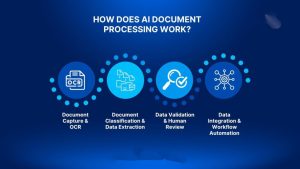
1. Document ingestion
Build an agent that pulls PDFs, Word files, and email attachments into a single storage layer. Use a simple file watcher or a webhook that triggers a function whenever a new file lands in a shared folder or a cloud bucket.
2. Requirement extraction
Feed the raw text to an LLM that returns structured JSON: key clauses, technical specs, and deadline dates. Store that JSON in a database so downstream agents can read it without re‑parsing the original document.
3. Compliance checking
Run a compliance matrix generator that compares extracted requirements with your internal regulations or industry standards. If a mismatch appears, the system flags it for human review.
4. Supplier matching
Query your supplier database or a third‑party API to find vendors that meet the extracted criteria. The agent can rank suppliers by past performance, price, and delivery time, then suggest a shortlist.

5. Bid drafting support
Once a supplier is chosen, another agent can auto‑populate a bid template with the required fields and even suggest pricing ranges based on historical data.
Integrate multiple AI providers for resilience
Relying on a single model can lead to outages or sudden cost spikes. Create a provider‑fallback layer that tries a free model first (e.g., Gemini or Groq) and falls back to a paid one like OpenAI if the result is low quality or a rate limit hits.
For image generation, use Cloudflare Workers AI with FLUX for quick sketches, and switch to a paid image model only if the output doesn’t meet clarity standards.
Deploy in a WordPress‑friendly way
Wrap the entire workflow in a lightweight SaaS or a WordPress plugin. Use WordPress Cron jobs to schedule routine scans and keep API keys hidden behind a secure backend. This keeps the front‑end simple while protecting credentials.
Common pitfalls and how to avoid them
- API rate limits , queue requests and implement exponential back‑off.
- Data privacy , encrypt sensitive tender data at rest and only send hashed identifiers to third‑party services.
- Model drift , periodically re‑train or fine‑tune the extraction model with fresh labeled data.
- Duplicate detection , run a similarity check on new documents before adding them to the system.
Practical tips you can start today
- Set up a free tier on a cloud storage bucket and link a webhook to a simple Python script that logs new files.
- Try a single document through an LLM that returns JSON. Verify the structure manually, then store it in a temporary table to see how downstream agents would read it.
Mini‑case: A regional contractor saves 3 days
A small construction firm in Ohio used our draft workflow to pull a federal tender PDF into a bucket, extract the scope, and auto‑populate a supplier shortlist. The whole process that usually took three days was cut to under 12 hours, giving the team more time to negotiate pricing.
Next steps
Sketch your tender workflow on paper, identify the bottlenecks, and start building the first agent. Keep the system modular so you can swap providers or add new steps as your business grows.








Discussion