
Profitable Side Hustles in Nigeria for Students
July 8, 2026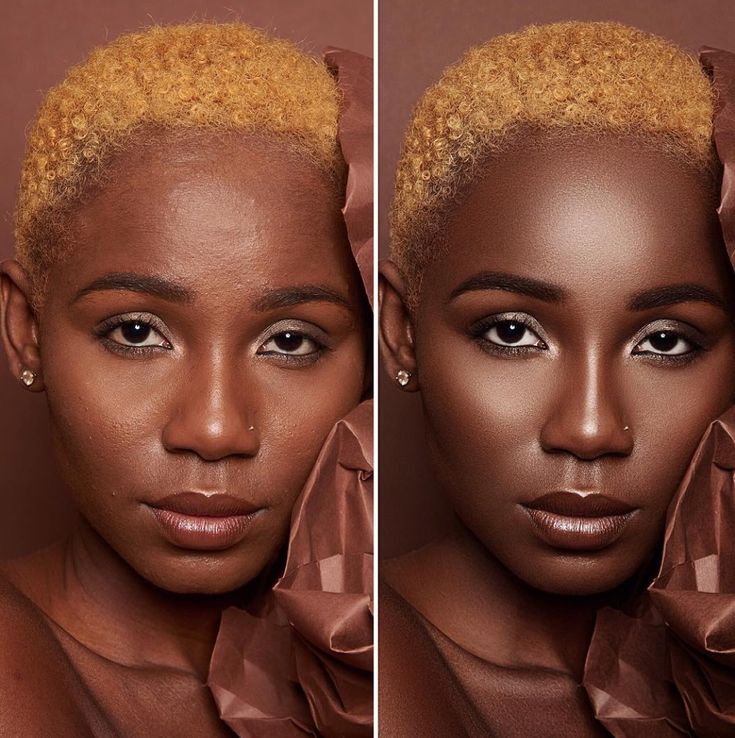
5 AI Skin Retouching Tools That Can Save Photographers Hours of Editing
For every photographer still hunched over a screen at 2am, cloning out blemishes one by one.
You shot a beautiful portrait session today. The light was perfect, your client loved every pose, and now here you are at midnight staring at forty photos, zoomed in at two hundred percent, manually softening skin one pore at a time. Three hours later you have edited five images and you still have thirty five to go. If this is your normal Tuesday night, you are exactly who these AI skin retouching tools were built for.
I have tested more editing software than I care to admit while building my own photography and content work. Most AI skin retouching tools promise magic and deliver plastic looking skin that screams filter instead of photograph. The five below are different. They are the ones photographers actually keep using after the free trial ends, because they cut editing time down to minutes while keeping skin looking like skin, not wax.
Why Manual Retouching Is Still Eating Photographers Alive
Retouching by hand was the standard for years, and plenty of photographers still believe it is the only way to get results a client will actually pay for. The truth is manual retouching simply does not scale. A wedding photographer delivering four hundred images cannot spend fifteen minutes on every single face without burning out or missing deadlines completely.
The other reason this problem persists is that early AI skin retouching tools genuinely were bad. They smoothed skin into an unnatural, doll like texture that experienced photographers rightfully rejected. That reputation stuck, so many photographers still avoid AI skin retouching tools today even though the newer generation has solved most of those problems.
Common Mistakes Photographers Make With Retouching
- Over relying on one slider. Cranking a single smoothing slider to maximum is what creates that plastic look, rather than using tools built for realistic frequency separation.
- Ignoring AI skin retouching tools out of old bias. Many photographers tried a bad AI plugin years ago and never revisited the category, missing how far the technology has improved.
- Retouching every photo the same way. Skin tone, lighting, and skin type all need slightly different settings, and treating every image identically produces inconsistent results.
- Skipping batch processing entirely. The biggest time savings from AI skin retouching tools come from batch editing, yet many photographers still process one image at a time out of habit.
The 5 Best AI Skin Retouching Tools for Photographers
Here is exactly how these AI skin retouching tools rank based on speed, natural results, and how well they fit into a real photography workflow.
Evoto AI
Evoto AI batch processes entire shoots in minutes, automatically detecting skin, eyes, and teeth without you drawing a single mask. Among AI skin retouching tools, this is the one built specifically for speed when you have hundreds of images and a tight deadline.
Retouch4me
Built as a set of specialized plugins rather than one giant tool, Retouch4me focuses purely on keeping skin texture intact while removing blemishes. Photographers who care most about realism consistently rank this among the top AI skin retouching tools available today.
Portraiture AI
If your workflow already lives inside Photoshop or Lightroom, Portraiture AI integrates directly rather than forcing you to export and reimport. It remains one of the most trusted AI skin retouching tools for studios that never left the Adobe ecosystem.
ON1 Portrait AI
ON1 Portrait AI handles skin, eyes, teeth, and even body shaping in one interface, built for photographers who want strong results without stacking five different plugins. A genuinely beginner friendly entry into AI skin retouching tools.
Adobe Photoshop
Photoshop's Neural Filters bring AI skin smoothing directly into the industry standard editor, giving experienced retouchers full manual control layered on top of AI assistance. Still the top choice when a client needs pixel level precision on every frame.
Before You Keep Reading
If you are the kind of photographer editing on a laptop with no proper gear yet, still building your name from nothing, I wrote Zero Gear, Big Dreams for exactly this stage. It is a brutally honest guide for the street smart hustler with creative fire but no camera, sharing the real mistakes and real lessons from building a media brand starting with nothing.
Get Zero Gear, Big Dreams — $3Step By Step: How To Actually Use AI Skin Retouching Tools
- Pick one tool from this list that matches your current workflow instead of trying all five on the same shoot.
- Run a small test batch of ten images first to judge how the tool handles your specific lighting and skin tones.
- Adjust the default intensity down slightly, most AI skin retouching tools ship with settings a touch stronger than most clients actually want.
- Batch process the rest of the shoot once your settings feel right, this is where the real time savings show up.
- Do a final manual pass on hero images only, keeping full manual control for the shots that matter most.
Frequently Asked Questions About AI Skin Retouching Tools
Do AI skin retouching tools make skin look fake?
Older tools often did, but modern AI skin retouching tools like Retouch4me and Evoto AI are built specifically to preserve natural skin texture rather than smoothing it away completely.
Which AI skin retouching tool is best for beginners?
ON1 Portrait AI is the most beginner friendly option on this list, combining skin, eye, and teeth retouching into one simple interface without needing plugin knowledge.
Can AI skin retouching tools replace manual editing completely?
For most images, yes. Many photographers still do a light manual pass on their hero shots, but AI skin retouching tools now handle the bulk of standard portrait work reliably.
Are these AI skin retouching tools worth it for wedding photographers?
Absolutely. Wedding photographers delivering hundreds of images benefit the most from AI skin retouching tools, since batch processing alone can save entire days of editing per wedding.
Final Thoughts
The days of manually cloning out every blemish on every photo are over, whether you have fully accepted it yet or not. These five AI skin retouching tools exist specifically to give you back the hours you used to lose to repetitive editing, without sacrificing the natural look clients actually want to see in their photos.
Pick one tool from this list, test it on your next shoot, and pay attention to how much time you actually get back. Once you feel that difference, going back to fully manual retouching starts to feel like a choice you no longer need to make.
AI skin retouching tools For every photographer still hunched over a screen at 2am, cloning out blemishes one by one.